

You’ve probably been there: you’re in a new city or just bored on a Tuesday night, scrolling through standard dating apps, only to find profiles that haven’t been active since 2022. You send a message, wait three days, and get nothing. It feels like shouting into a digital void. You want to know who is nearby right now, who is actually looking to meet, and where the “vibe” is currently happening. The frustration of stagnant apps is real, and it’s exactly why the traditional grid-style layout is losing ground to something more immediate.
What is the Sniffies Map App?
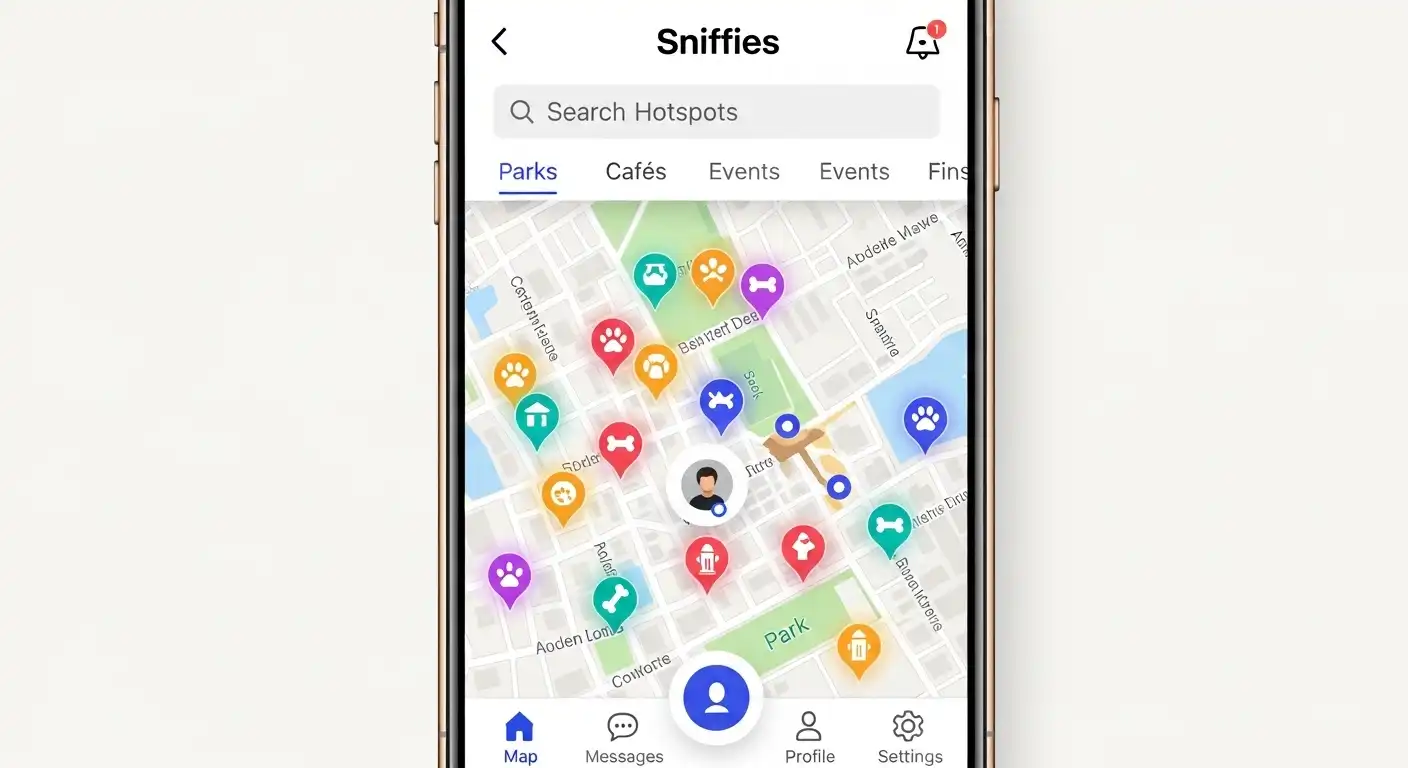
The Sniffies map app is a map-based social platform designed primarily for the gay, bi, and queer community to facilitate spontaneous, real-time connections. Unlike apps that show you a static list of people sorted by distance, this platform places users and “active spots” directly on an interactive map.
Think of it as a high-tech radar for your social life. It focuses on proximity and presence. It tells you not just who is in your city, but who is currently active and where groups are congregating. It’s built on the philosophy that if you can see the activity, you can join the activity without the endless back-and-forth of “Where are you?” and “What are you doing?”
The Sniffies Map App Explained with a Real Scenario
Imagine you are traveling to Chicago for a weekend. You’re staying in a neighborhood you don’t know well. On a typical app, you’d see dozens of guys, but you have no idea if they are at home, at a bar, or just passing through in an Uber.
By opening the Sniffies map app, you see a different story. You notice a “glow” or a cluster of activity icons near a specific street corner. You realize that’s not just a random spot; it’s a popular local lounge that’s currently hosting an event.
You see individual icons nearby that are “active” within the last five minutes. Instead of guessing, you see that the local community is gravitating toward a specific park or venue. You can check the “cruising” spots—places where people traditionally meet up—and see if they are currently busy. This visual data removes the guesswork of social navigation.
How to Use the Sniffies Map App: A Step-by-Step Guide
Getting started is simple, but mastering the interface requires a bit of finesse to ensure you are seeing what you want while staying safe.
-
Set Up Your Profile: Start by adding a clear photo and a concise bio. Because the map moves fast, people tend to make split-second decisions based on your profile preview.
-
Adjust Your Map Filters: Use the filter icon to narrow down who you see. You can filter by age, interests, or specific “vibe” tags. This keeps the map from becoming cluttered.
-
Check the “Hotspots”: Look for areas on the map with higher concentrations of icons. These are usually public spaces or venues where the community is currently active.
-
Use the “Status” Feature: Set your status to “Looking” or “Just Browsing.” This tells others on the map whether it’s worth sending you a message or if you’re just observing.
-
Share Your Location (Safely): You can choose to show your precise location or a generalized area. For most users, a generalized area provides enough context for a meetup without giving away your exact front door.
40 cm to in: The Precise Guide for Home & Design
Common Mistakes People Make
Even tech-savvy users often stumble when using the Sniffies map app. The most frequent error is ignoring privacy settings. Because the app is map-centric, if you leave your “Live GPS” on while at home, you are essentially pinning your residence for everyone to see.
Another mistake is failing to check the “Last Active” timestamp. The map might show an icon in a specific park, but if that person hasn’t refreshed their status in 40 minutes, they might already be miles away. Always look for the green “active” indicator before initiating a conversation.
Lastly, many users treat it like a standard dating app and send long, introductory paragraphs. The map-based culture is built on immediacy. A quick, “Hey, I’m at the cafe nearby, want to chat?” is far more effective than a life story.
Sniffies vs. Traditional Dating Apps
Understanding the difference helps you choose the right tool for your specific goals.
| Feature | Sniffies Map App | Traditional Apps (Grindr/Tinder) |
| Primary View | Interactive Map | Vertical or Horizontal Grid |
| Focus | Spontaneous meetups & locations | Individual profiles & distance |
| Real-time Data | High (shows active clusters) | Medium (shows “last online”) |
| Location Precision | High (can see specific streets) | Moderate (distance in feet/miles) |
| Discovery | Based on “where” things happen | Based on “who” is nearby |
Pro Tips for the Best Experience
To get the most out of the Sniffies map app, you need to think like a local guide. First, use the “Place” feature to see historical data on certain spots. Some locations are only active on Friday nights, while others are daytime favorites.
Second, utilize the incognito or “Ghost” modes if you want to check the map without appearing on it. This is great for scouting a location before you decide to “check-in” and make yourself visible to the crowd.
Finally, keep your “Looking For” tags updated. The map icons often change based on what people are seeking. If you’re just looking for a drink and a conversation, make sure your tag reflects that so you don’t attract the wrong type of attention.
Frequently Asked Questions
Is the Sniffies map app free to use?
Yes, the basic map and messaging features are free. There are premium tiers that offer more advanced filters, the ability to see who viewed you, and enhanced privacy controls, but you can find plenty of activity on the free version.
How do I hide my house on the map?
Go to your privacy settings and enable “Location Offsetting.” This will place your icon in a random spot within a few hundred feet of your actual location, ensuring your exact address remains private.
Can I use the app on a desktop computer?
Yes, unlike many competitors, the platform is very robust on web browsers. This allows you to browse the map on a larger screen before you head out, which is often easier than squinting at a phone screen.
What do the different colored icons mean?
Icons usually change based on the user’s status or the type of location. For example, a “flame” might indicate a particularly high-traffic area, while different colored dots represent various levels of user activity or subscription status.
Is it safe to meet people through a map app?
Like any social platform, safety depends on your habits. Always meet in public first, tell a friend where you are going, and trust your instincts. The map provides the location, but you provide the common sense.
The Sniffies map app has fundamentally changed how the community interacts by turning the city into a living, breathing social board. It moves away from the “window shopping” feel of older apps and encourages you to actually get out and engage with the world around you.
The next time you find yourself staring at a static grid of faces, wondering if anyone is actually out tonight, close the grid and open the map. Take one action today: open the app, set a 15-minute timer, and just observe the movement in your neighborhood. You’ll be surprised at how much life is happening just a few blocks away.
